
TIME, ATTENDANCE & LEAVE
Manage work time, employee requests, and the information your teams need for everyday attendance and leave processes.
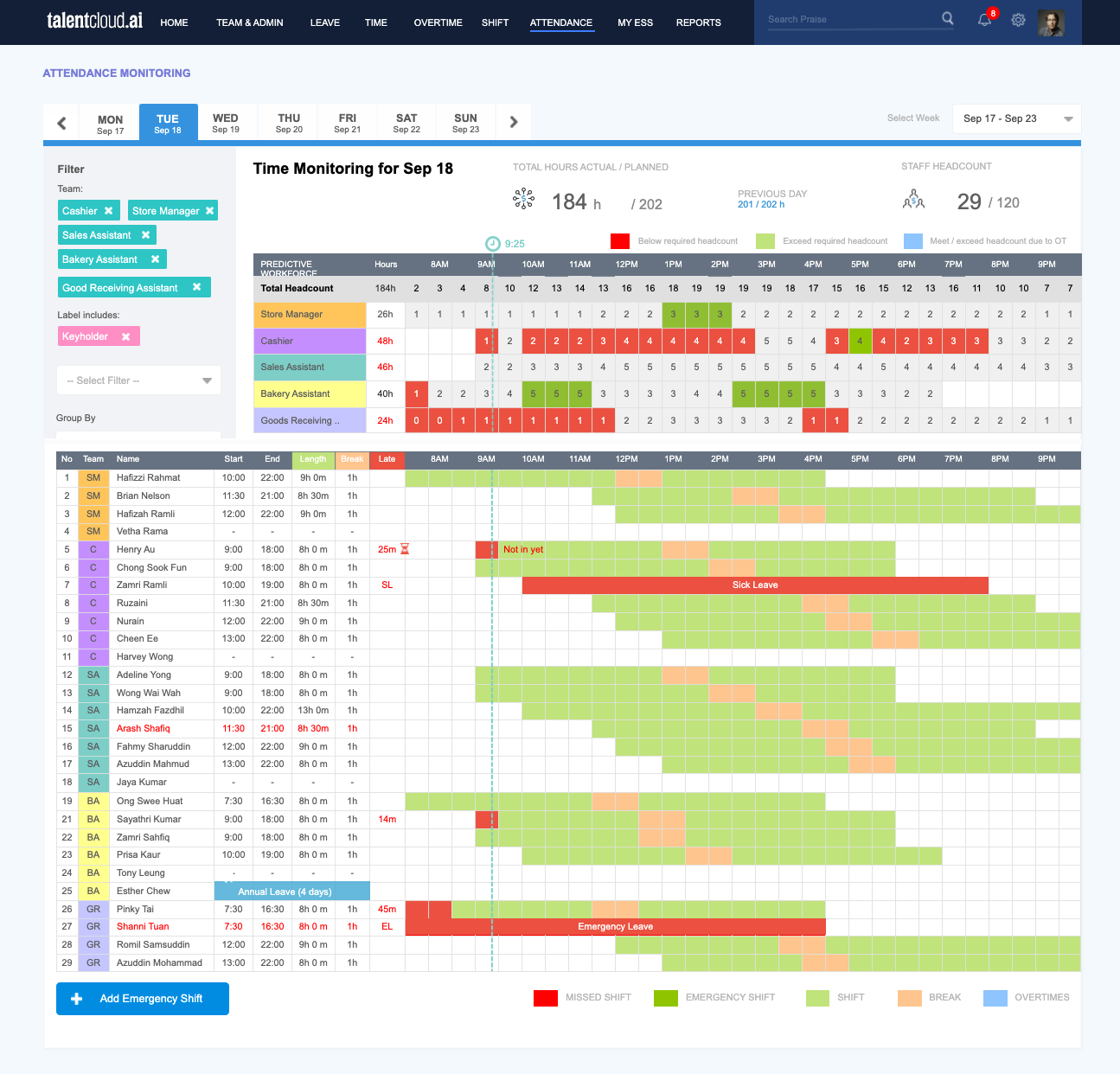
ATTENDANCE
TalentCloud can support attendance records and profiles that reflect the working arrangements your organisation configures.
Record clock-in and clock-out activity through the attendance methods enabled for your organisation.
Review attendance logs and relevant details in a structured record.
Use attendance photos where this option is enabled in your configuration.
WORK SCHEDULES & SHIFT PLANNING
Set up work schedules and shift groups to reflect the working patterns your company uses. The available settings follow your chosen configuration.
01
Define work schedules that support the working days and hours your organisation uses.
02
Organise relevant groups and shift arrangements for the teams that need them.
03
Apply schedules and shift arrangements according to your company setup and role access.
TIMESHEETS
Timesheets can help employees and HR maintain relevant time entries based on the records and processes your organisation enables.
Capture and maintain time entries where timesheets are part of your setup.
Make relevant entries available for review through the workflow configured by your organisation.
OVERTIME
Support overtime requests, review, and adjustments in a process that can be configured around your organisation’s policies.
Employees can submit overtime requests and managers can review them according to the approval workflow in use.
Maintain relevant overtime adjustments and budget information where these options are configured.
Prepare approved overtime information for downstream use according to your payroll process and configuration.
LEAVE MANAGEMENT
Set up leave types, policies, and profiles that reflect your company rules, then make relevant balances and requests available to the right people.
Define leave types, policies, and leave profiles around your company’s requirements.
Review relevant balances, carry-forward, and adjustments as configured for each leave profile.
Support leave requests and relevant team leave calendar views through assigned permissions.
EMPLOYEE & MANAGER EXPERIENCE
Employee Self-Service and role-based workflows help make relevant requests and decisions accessible to the people involved.
View relevant attendance or leave information, submit available requests, and follow their status through ESS.
Review requests and relevant records through the access and approval paths assigned to their role.
Maintain settings, review records, and prepare relevant inputs according to the modules and processes in use.
CONNECTION TO PAYROLL
Approved attendance and overtime information can be used as payroll inputs according to your company policies, selected modules, and configuration.
Relevant attendance and overtime records follow the processes your organisation configures.
Relevant records can be reviewed through the approval workflow in use.
Approved information can be prepared for payroll according to your selected setup.
The way approved data is used in payroll follows the policies and configuration your organisation has in place.
TIME, ATTENDANCE & LEAVE FAQ
Yes. Available work schedules, attendance profiles, leave types, policies, and profiles depend on the modules and configuration selected for your organisation.
Employees and managers can access relevant information and actions according to their assigned roles, permissions, and approval workflows.
Leave balances, carry-forward, and adjustments follow the leave policies and profiles configured by your organisation.
Reviewed attendance and overtime information can be used as payroll inputs where the relevant modules, policies, and configuration are in place.
RELATED SOLUTIONS
Explore how employee information, attendance, and other people processes can connect through TalentCloud.
READY TO TALK TIME & LEAVE?
Share your priorities and we will help you explore an approach that fits your people operations.
A modular HCM platform for connected HR operations.
Platform Overview
Core HR & Employee Self-Service
Time, Attendance & Leave
Tell us about your HR priorities and we will help you explore the right TalentCloud setup.
u00a9 TalentCloud. All rights reserved.
Privacy Policy Terms of Service